Emacs comes with numerous default keybindings, which inevitably conflict with system-level shortcuts. For Emacs beginners, resolving these conflicts can be a significant challenge.
One of the most common conflicts is with the command set-mark-command, which
default binding is C-SPC~(Ctrl+Space)1. On Windows, Ctrl+Space is
often used to toggle between English and Chinese input methods, which can makeCtrl+Space unusable for marking in Emacs.
To resolve this issue, you can either use the alternative binding forset-mark-command, C-@, or disable the Ctrl+Space functionality in
Windows. Additionally, since the spacebar can
be operated easily with either thumb, there is a “third option”: you can
configure the Ctrl+Space so that one side Ctrl+Space is reserved for
Windows, while the other side Ctrl+Space is available for Emacs or other
applications. This is the solution I adopted because it allows me to
maintain my habit of using both thumbs for operation.
In the latest version of Windows 11, you can achieve this as follows:
Go to
Settings > Time & Language > Language & region > Options > Microsoft Pinyin > Keys, and uncheck theCtrl + Spacebox while leavingShiftchecked.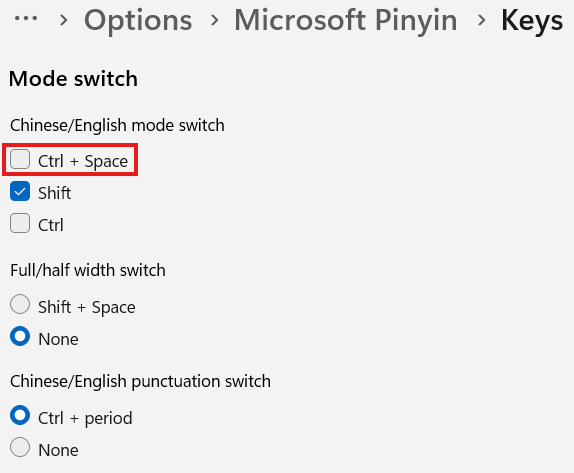
Open PowerToys (install it if you don’t already have it). In the
Keyboard Managersection, add a key remapping: mapCtrl(Left) + SpacetoShiftorWin(Left) + Space.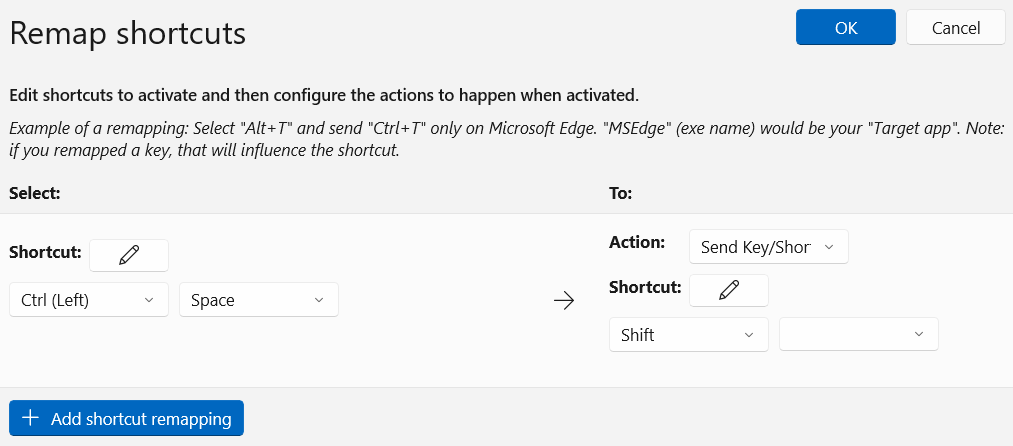
For older versions of Windows, where there’s a UI bug preventing such changes 2, you can solve this by manually editing the registry:
- Navigate to
HKEY_CURRENT_USER\Control Panel\Input Method\Hot Keys\00000010. Modify the value ofKey Modifiersto02 80 00 00, or02 40 00 003. - If you want to apply this change for all new users, make the same
modification under
HKEY_USERS\.DEFAULT\Control Panel\Input Method\Hot Keys\00000010.
After making these changes, restart your computer to take effect.
It seems that only Ctrl+Space can be “split,” as other key combinations are
naturally easier to reach with one hand. For example, Ctrl+a inherently impliesRight Ctrl+a.
Emacs uses unique convention for keybinngs, where
C-SPCis shorthand forCtrl+Space. This article adopts the common convention for now. ↩︎https://superuser.com/questions/327479/ctrl-space-always-toggles-chinese-ime-windows-7 ↩︎
02 indicates Ctrl, 80 indicates the left side, and 40 indicates the right side.https://learn.microsoft.com/en-us/windows/win32/tsf/tf-mod--constants ↩︎